
Jira Service Desk is now called Jira Service Management. The product has developed from an IT support tool into a broader service-management platform that can also support HR, legal, facilities and other internal business teams.
These teams often face the same operational problems as an IT service desk:
- Requests arriving through email, chat and informal conversations
- Incomplete information from employees
- Unclear ownership and priorities
- Manual approval processes
- Limited visibility of request status
- Repeated questions that could be answered through self-service
Jira Service Management can replace those fragmented processes with structured request forms, queues, workflows, approvals, automation and a self-service portal.
However, simply creating a Jira project does not improve service delivery. Each team needs clearly defined services, ownership, permissions and measures that reflect the work it performs.
This guide explains how HR, legal and facilities teams can use Jira Service Desk, now Jira Service Management, and what organisations should address before rolling it out.

What is Jira Service Desk?
Jira Service Desk was Atlassian’s service-desk product for managing support requests, workflows and service-level expectations. It is now part of Jira Service Management, commonly shortened to JSM.
Jira Service Management provides a central system through which employees or customers can:
- Submit a request through a portal, form or connected channel
- Provide the information required to process that request
- Track its progress
- Receive updates and decisions
- Access relevant knowledge and guidance
Behind the portal, service teams can categorise work, route requests into queues, assign owners, apply approval stages, automate actions and monitor service performance.
Although many of its capabilities originated in IT service management, the same model can be applied to internal services delivered by HR, legal, facilities, finance and other operational teams. This broader use is commonly described as enterprise service management.
Why use Jira Service Management for business teams?
Most internal service problems are not caused by a lack of effort. They are caused by inconsistent intake, unclear ownership and weak visibility.
Email is particularly poor at managing repeatable services. Requests are difficult to prioritise, information is missing, approvals become buried in threads and employees cannot see what is happening.
Jira Service Management creates a structured route from request to resolution.
| Common problem | Jira Service Management response |
|---|---|
| Requests arrive through multiple channels | A central portal and defined request types standardise intake |
| Employees omit important details | Forms collect the required information before work begins |
| Ownership is unclear | Queues, routing rules and assignments identify the responsible team or person |
| Approvals are delayed | Approval stages and notifications move decisions through a defined workflow |
| Employees repeatedly ask for updates | Request status and automated notifications improve visibility |
| Teams answer the same questions repeatedly | Knowledge content and self-service reduce avoidable requests |
| Managers cannot see demand or performance | Dashboards and reports show volume, response, resolution and service trends |
The value does not come from digitising every existing process exactly as it is. It comes from simplifying the service before configuring the workflow. 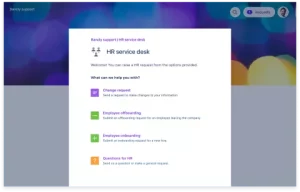
Core Jira Service Management capabilities for business teams
Structured request forms
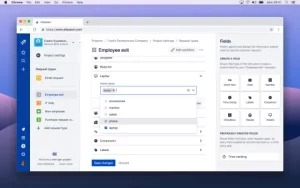
Forms can collect the information needed to process a request correctly. Different request types can display different fields, guidance and conditional questions.
For example, a new-starter request may collect the employee’s start date, manager, location, role, equipment needs and required system access. A legal-review request may collect the contract type, counterparty, value, deadline and business owner.
Queues and ownership
Requests can be organised into queues based on service, priority, status, location, team or other criteria. This gives service teams a shared operational view and reduces reliance on personal inboxes.
Workflows and approvals
Workflows define how requests move from submission to completion. They can include review stages, approvals, requests for further information and escalation routes.
Approval workflows can record the decision in Jira. Specialist actions such as electronic signatures normally require an integration with a suitable contract or signing platform.
Automation
Automation rules can route requests, assign owners, notify stakeholders, create related tasks and escalate work when agreed conditions are met.
Automation should remove repetitive administration. It should not make an already overcomplicated process harder to understand.
Self-service and knowledge
A service portal gives employees one place to request help and track progress. When connected to an appropriate knowledge base, it can also answer common questions before a request is raised.
Reporting and service visibility
Dashboards and reports help managers understand demand, response times, bottlenecks and recurring issues. This evidence can support better staffing, process improvement and service design.
Integration with the wider Atlassian environment
Jira Service Management can work alongside other Atlassian products. Confluence can provide knowledge content, while Jira can connect service requests with work performed by technology, operations or delivery teams.
Integrations with HR systems, identity platforms, document tools, communication platforms and specialist applications may require additional configuration or Marketplace apps.
How HR teams use Jira Service Management
HR teams can use Jira Service Management to organise repeatable employee services without forcing employees to understand internal departmental structures.
Typical HR request types include:
- Employee onboarding
- Employee offboarding
- Changes to role, location or employment details
- Policy and benefits questions
- Equipment or workplace adjustments
- Training requests
- Letters and employment documents
- General HR support
Example: employee onboarding
A manager submits a new-starter request through the employee portal. The form collects the start date, role, location, line manager and required equipment or access.
The workflow can then create and coordinate related work for:
- HR administration
- IT accounts and access
- Equipment provisioning
- Facilities and building access
- Payroll or finance
- Mandatory training
The manager can see progress without chasing each department individually. Automated reminders can highlight incomplete work before the employee’s start date.
HR configuration considerations
Not all HR work should be placed in a general service project. Employee-relations cases, grievances, investigations and health information may require stricter permissions, separate workflows or a specialist HR case-management system.
Before launch, HR should define:
- Which services belong in the portal
- Who can view each request type
- Which information is genuinely required
- How long records should be retained
- Which systems remain the authoritative employee record
How legal teams use Jira Service Management
Legal teams often receive work through direct emails, messages and informal conversations. That makes demand difficult to prioritise and leaves business stakeholders unsure about progress.
Typical legal request types include:
- Contract review
- Non-disclosure agreements
- Data protection questions
- Marketing or advertising approval
- Procurement support
- Policy interpretation
- Intellectual property questions
- Requests for standard legal documents
Example: contract review
A business stakeholder submits a contract-review request containing the counterparty, contract type, commercial value, target date, business owner and relevant documents.
The workflow can:
- Check that the required information is present.
- Route the request according to contract type or risk.
- Assign the appropriate legal owner.
- Request missing information.
- Record internal approvals.
- Update the stakeholder as the review progresses.
- Connect to a document or electronic-signature system where required.
This creates a visible legal intake process without pretending that Jira itself replaces a contract lifecycle management platform.
Legal configuration considerations
Legal requests may contain commercially sensitive or privileged information. Portal access, agent permissions, request participants and connected document repositories need careful configuration.
The organisation should also decide which information belongs in Jira and which should remain in a controlled legal document system.
How facilities teams use Jira Service Management
Facilities teams can use Jira Service Management to manage workplace requests across buildings, locations and suppliers.
Typical facilities request types include:
- Maintenance and repairs
- Heating, lighting and environmental issues
- Building access
- Office moves
- Workspace and meeting-room problems
- Equipment or furniture requests
- Cleaning or waste issues
- Health and safety concerns
Example: maintenance request
An employee submits a request containing the location, issue category, urgency, description and supporting photographs.
The request can be routed according to site and issue type, assigned to an internal team or supplier and escalated when it presents a safety or operational risk.
The workflow may include:
- Initial triage
- Risk and priority assessment
- Assignment to the appropriate contractor
- Site attendance
- Repair confirmation
- Employee acceptance or follow-up
Facilities configuration considerations
Facilities teams need consistent location, building and asset information. Without reliable categorisation, dashboards and routing rules quickly become inaccurate.
Where assets, maintenance schedules or supplier contracts are complex, Jira may need to integrate with an asset-management or facilities-management system rather than replacing it.
How to set up Jira Service Management for a business team
1. Define the service before configuring Jira
List the services the team provides, who can request them and what a successful outcome looks like.
Do not begin by copying every existing email process into Jira. Remove unnecessary stages and clarify ownership first.
2. Prioritise a small number of request types
Start with repeatable, high-volume services where inconsistent intake or manual coordination creates visible friction.
For example:
- HR onboarding
- Legal contract review
- Facilities maintenance
A controlled pilot is easier to improve than a portal containing dozens of poorly designed request types.
3. Design the request forms
Collect only the information needed to route, assess and complete the request. Use clear employee-facing language rather than internal team terminology.
4. Define ownership and queues
Decide who receives each request, how priority is determined and what happens when ownership is unclear.
5. Build the workflow
Map the minimum stages required from submission to completion. Add approvals only where they are necessary for risk, authority or financial control.
6. Configure service expectations
Define expected response and resolution times where appropriate. Not every internal request requires a formal SLA, but employees should understand what level of service to expect.
7. Configure permissions and sensitive-data controls
Test who can create, view, edit and search for each type of request. Do not assume that portal access, agent access and issue visibility are the same thing.
8. Add automation carefully
Automate routing, reminders and repetitive actions where the underlying rule is clear. Avoid building complex automation before the team has tested the process manually.
9. Pilot with real users
Test the portal with employees who are unfamiliar with the internal process. Look for unclear request names, missing guidance and unnecessary fields.
10. Review and improve
Use request data, user feedback and service performance to improve the forms and workflows after launch.
Security and governance for HR, legal and facilities requests
Using Jira Service Management outside IT introduces more sensitive information into the Atlassian environment.
Governance should therefore be designed before business teams begin adding services.
Review:
- Portal and customer access
- Agent roles and administrative permissions
- Request visibility and issue security
- External participants and suppliers
- Connected systems and Marketplace apps
- Identity and access management
- Audit logging
- Data retention and deletion
- Attachment and document storage
A request portal should make services easier to access. It should not make confidential information easier to expose.
Where the same Jira environment supports multiple departments, establish shared governance for naming, permissions, automation, reporting and administration. Otherwise, each team may create its own inconsistent version of the platform.
Which Jira Service Management metrics should business teams track?
The right metrics depend on the service. A facilities repair, contract review and onboarding request should not all be judged in the same way.
| Metric | What it shows |
|---|---|
| Request volume | Demand by service, team, location or period |
| First-response time | How quickly the team acknowledges and begins assessing work |
| Resolution time | How long requests take from submission to completion |
| Ageing requests | Work that is becoming delayed or blocked |
| Reopened requests | Requests that were closed without fully resolving the need |
| SLA or service-target performance | Whether agreed service expectations are being met |
| Self-service rate | Questions resolved through guidance without agent intervention |
| Employee satisfaction | How users experience the service |
Do not optimise only for closing requests quickly. A fast closure is not useful if the employee has to reopen the request or contact the team through another channel.
Common Jira Service Desk mistakes to avoid
Digitising a broken process
Automating an unnecessary approval or poorly understood workflow makes the problem faster, not better.
Creating too many request types
A large portal catalogue can make it harder for employees to find the right service. Begin with a focused set of clearly named requests.
Using internal terminology
Employees should not need to understand the organisation chart to request help. Name request types around the outcome they need.
Ignoring permissions
HR and legal information cannot be treated like ordinary IT support tickets. Visibility must be deliberately tested.
Assuming Jira replaces every specialist platform
Jira Service Management can coordinate requests and workflows, but it may not replace an HR information system, contract lifecycle platform, electronic-signature service or facilities-management system.
Allowing every team to configure Jira independently
Uncontrolled local configuration creates duplicated workflows, inconsistent fields, unnecessary Marketplace apps and weak reporting.
Organisations with several Jira instances or heavily customised environments should also consider whether consolidation and platform governance are needed. Read when Jira consolidation becomes a delivery issue.
Jira Service Desk is now Jira Service Management. Learn how HR, legal and facilities teams use it to manage requests, approvals and workflows.
How Catapult helps organisations improve Jira Service Management
Catapult helps organisations design, configure and govern Jira Service Management for both IT and business teams.
We can help you:
- Define services and request types
- Design forms, queues and workflows
- Configure approvals and automation
- Set up permissions and access controls
- Connect JSM with Confluence, Jira and other systems
- Improve reporting and service visibility
- Remove unnecessary complexity and duplicated configuration
- Establish platform governance as usage expands
Where Jira is already in place, an Atlassian Excellence Review can identify permission risks, inefficient workflows, reporting gaps and unnecessary apps before further services are added.
Explore Catapult’s Atlassian consulting services or talk to us about your Jira Service Management requirements.
Frequently asked questions
Is Jira Service Desk the same as Jira Service Management?
Jira Service Desk is the former name of Jira Service Management. Jira Service Management retains service-desk capabilities such as request portals, queues, workflows, approvals and reporting, while supporting a broader range of IT and enterprise service-management use cases.
Can HR teams use Jira Service Desk?
Yes. HR teams can use Jira Service Management for services such as onboarding, offboarding, policy questions, employment documents and general employee requests. Sensitive HR cases may require stricter permissions, separate workflows or specialist HR software.
Can legal teams use Jira Service Management?
Yes. Legal teams can use it to manage contract reviews, policy questions, data protection requests and other legal intake. Electronic signatures and specialist contract lifecycle functions normally require connected legal or document-management systems.
How can facilities teams use Jira Service Management?
Facilities teams can manage maintenance, building access, office moves, equipment, health and safety issues and other workplace requests. Requests can be routed by location, issue type, priority or supplier.
Does Jira Service Management require coding?
Many forms, queues, workflows and automation rules can be configured without custom code. Complex integrations, permissions, data migrations and large-scale governance may still require experienced platform support.
Can business teams manage Jira Service Management without IT?
Business teams can manage many day-to-day request types and workflows, but the organisation should retain central governance for security, permissions, integrations, apps, data and platform standards.
Is Jira Service Management suitable for confidential HR and legal requests?
It can support confidential requests when permissions, issue visibility, user access and connected systems are configured correctly. Sensitive-data requirements should be assessed and tested before launch.
What is enterprise service management?
Enterprise service management applies service-management principles beyond IT. It gives departments such as HR, legal and facilities structured ways to receive, route, complete and measure internal service requests.